PODs without the chasing.
Get the POD as soon as the driver submits it. A photo or electronic signature, straight from their phone—saving calls and emails chasing subcontractors.

Instant PODs. Recorded waiting time.
Less chasing for your office.
Give every subcontracted job a simple driver link. Follow progress, collect delivery evidence and keep your customers automatically informed.
No card required · No driver app or account needed
Get the POD as soon as the driver submits it. A photo or electronic signature, straight from their phone—saving calls and emails chasing subcontractors.
Recorded arrival and departure times support waiting charges. Your agreed rules calculate the costs; approved supplier charges flow onto the PO, helping resolve invoice queries.
Enable automatic arrival emails, warnings before waiting charges start and departure summaries. Customers can also check the latest job status in their portal.
Your own-fleet drivers can use Saltwell job links for progress updates and PODs, with customer notifications and waiting rules in the same workspace. TMS integration is a separate option, subject to setup and availability.
Enter the route, customer reference, agreed rate, PO and waiting terms. Create it directly or from a quote.
Send the driver link to your own driver, or let the subcontractor office pass it on. The driver enters their details and accepts.
The driver taps the next clear step at collection and delivery. The office sees the latest recorded progress.
Recorded time feeds the agreed waiting rules and calculated PO charges, with office review for exceptions.
Paper or paperless delivery evidence stays with the job, ready for the office and permitted customer access.
Your own driver or subcontractor driver opens the job link, enters their details and records each stage through clear buttons.
Updates need an internet connection. Live status reflects the latest driver-recorded milestone, rather than GPS tracking.
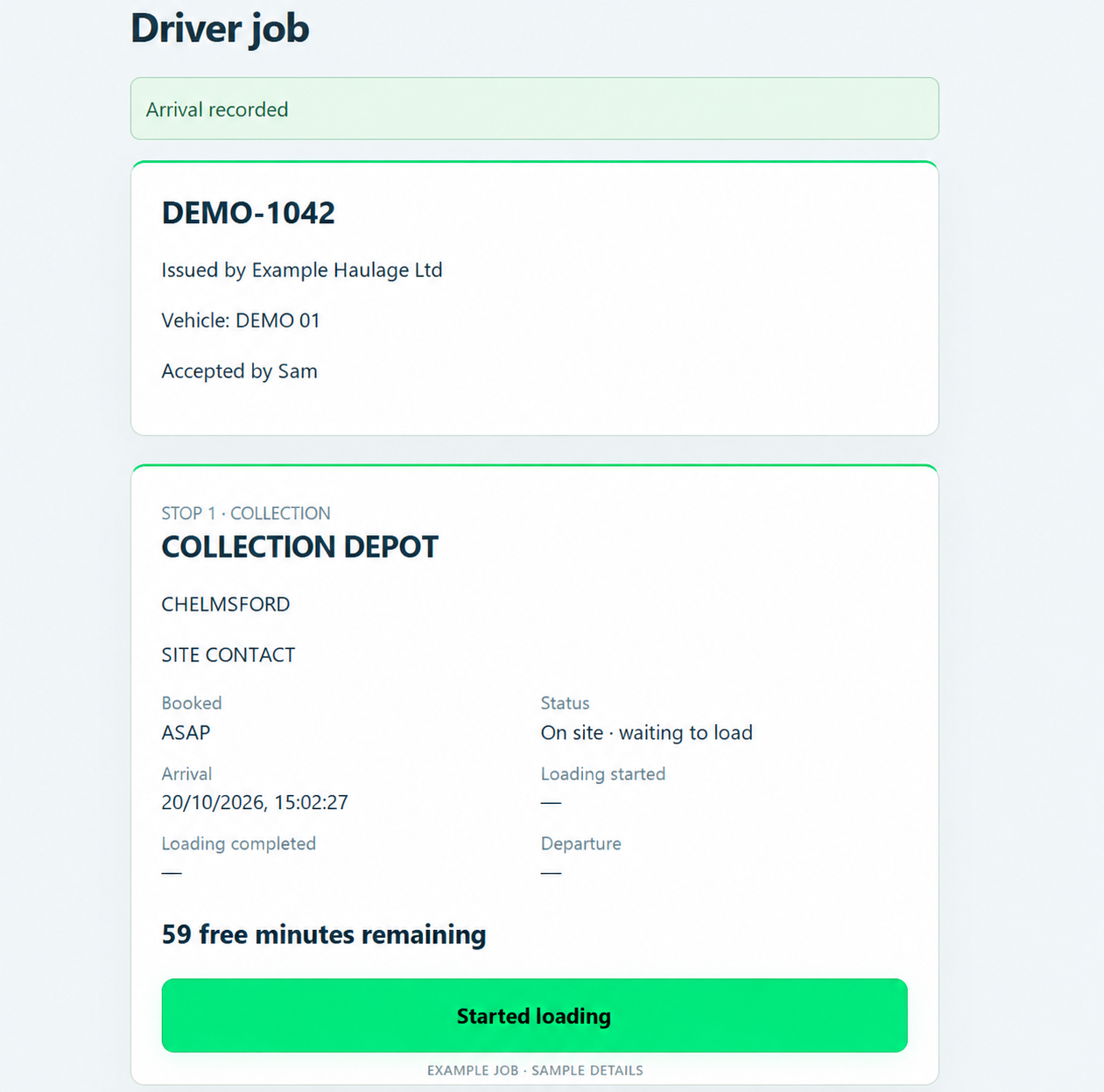
Set the free time, rate and charging blocks for each customer and job. Quotes make the agreed transport rate and waiting terms visible before acceptance.
Driver-recorded arrival and departure provide the time record. Booked times and late-arrival rules help identify exceptions for office review.
Calculated supplier waiting costs flow onto the PO, reducing manual updates and giving both offices a clearer record for invoice checks.
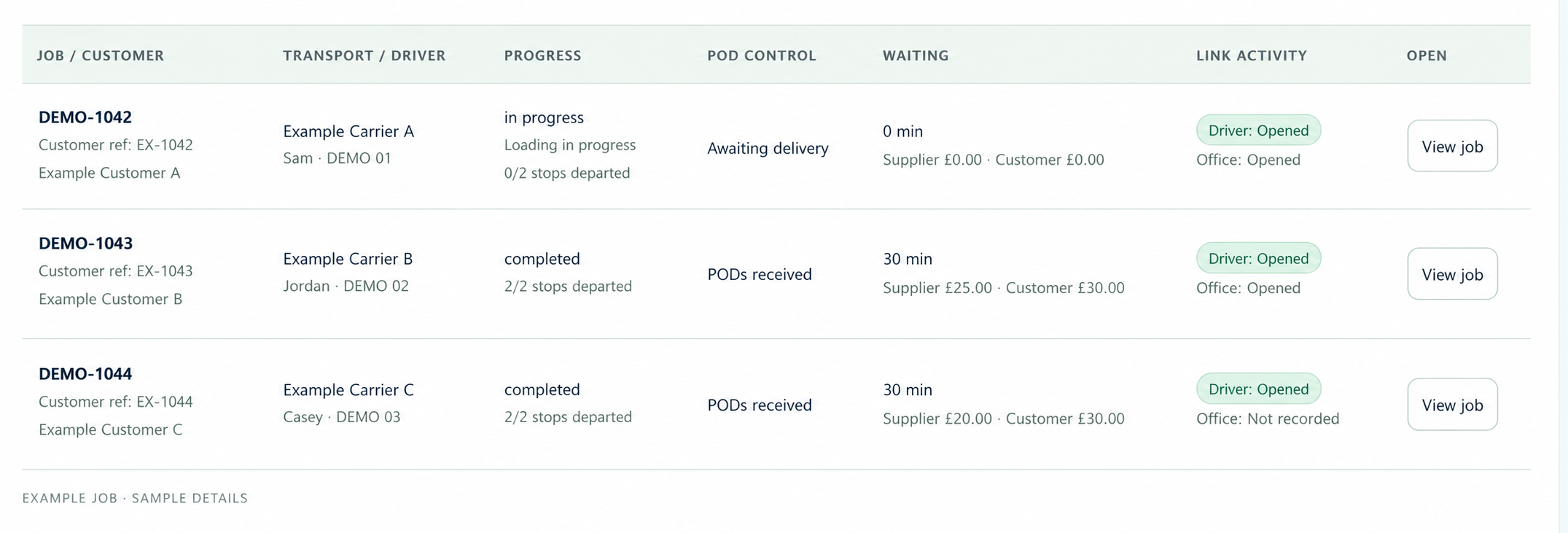
Supplier purchase costs and customer sales charges remain separate. The job list shown here displays waiting amounts; it is not a screenshot of the PO document.
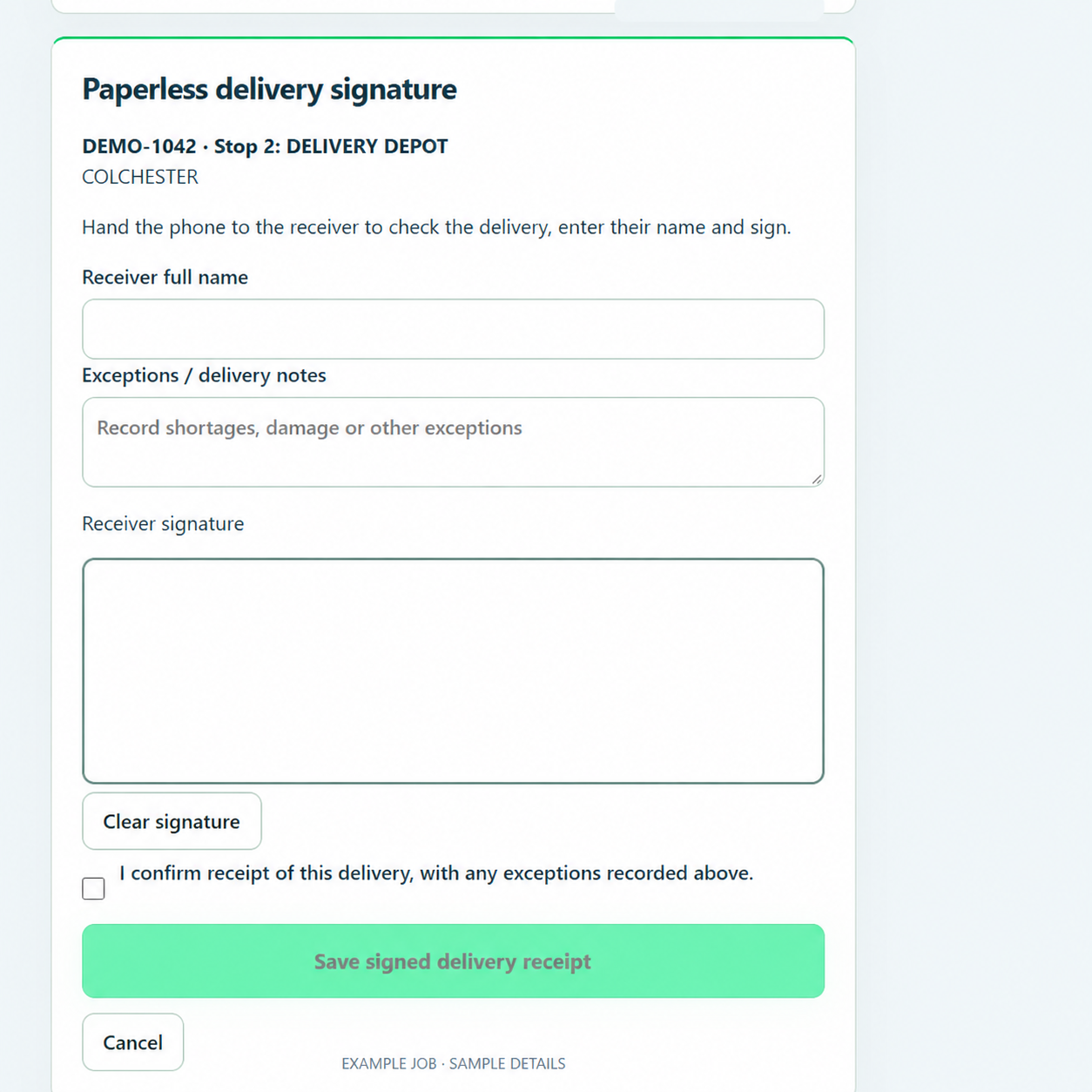
Drivers can submit a POD photo through their job link, or hand the phone to the receiver to enter a name, record delivery notes and sign.
Delivery evidence stays with the job and is available after submission. No separate driver subscription, account or app download is needed.
Start free trial ↗Enable automatic arrival, waiting, departure and POD emails for each job. Customers can also use their portal to find permitted jobs by reference and check the latest status or available POD.
Share a clear job and waiting terms. Keep progress and waiting records together, with a driver link the office can pass on.
Distinguish a job still incurring waiting from its final calculated charge after departure. Review exceptions and extra charges with the job information in one place.
This subscription is the standalone platform for jobs entered into Haulage Control. TMS integration is in development, is not included and is not available as part of this launch plan.
Set the customer’s email recipients and notification preferences once on the job. Haulage Control then automatically sends the enabled emails as drivers record progress and the agreed waiting allowance runs down—saving your team from writing and sending each update.
The system automatically emails the customer when the driver records arrival, confirming that the driver is on site.
The system automatically emails a warning 30 minutes before chargeable waiting begins, where the agreed allowance and arrival timing permit.
The system automatically emails when chargeable waiting starts, explaining that the driver is still on site and the charge is ongoing—not the final cost.
The system automatically emails when the driver records departure, showing the calculated waiting charge or clearly flagging any waiting eligibility requiring office review.
The system automatically emails when signed delivery evidence is submitted and available for the job.
Full progress without filling their inbox. Loading and unloading stages appear in the live job view and customer portal. If enabled, the system also automatically sends on-site email summaries every 30 or 60 minutes. These can be left switched off.
You choose the cadence. Once notifications are enabled, emails are queued and sent automatically at the selected sending frequency, based on recorded driver updates and waiting rules. Loading and unloading do not currently send a separate milestone email.
| Who | How they access the job | Subscription |
|---|---|---|
| Your transport company | Your company workspace, with individual team logins and access permissions. | One subscription for your company. |
| Subcontractor office | Secure office link for each job, with a separate link to pass to the driver. | Included — no extra subscription. |
| Subcontractor driver | Simple job link on their phone. No account or app download needed. | Included — no extra subscription. |
| Your customer | Automatic email updates when enabled, plus invited portal access to the jobs you share. | Included — no extra subscription. |
Job links give access to job information. Share each office or driver link only with the intended recipient.
SALTWELL CONNECT
Accept the booking, allocate the driver and keep both offices updated — without entering the job twice.
Connect your company workspaces by invitation. Incoming bookings arrive ready for review, so your team can accept the route and choose its own fleet or subcontractor.
Arrival, loading, unloading, departure and PODs feed through the linked jobs. Each office can follow progress in its own workspace.
Each company keeps its own supplier prices, customer charges, waiting rules and POs. Extra charges need a separate approval at each stage.
Available when both companies have an active paid subscription. Subcontractors without a subscription can still use the simple booking and driver links.
The subcontractor office can request an extra charge with an amount and supporting explanation while the job is underway. No new portal or account is required.
Pending requests appear in your Jobs & PODs view, refreshing every 30 seconds while it is open. Your team approves or rejects each request with a reason.
Only approved extras enter the PO total. Once the job, PODs and all costs are resolved, your office confirms the final PO. The subcontractor can download it and quote its number on the invoice.
The PO stays provisional until office finalisation. Later corrections require reopening it with a reason; the previous final version remains in the audit history.
Try Haulage Control with your team for 14 days.
No card needed to start your trial.